
The Model Is Not the Agent
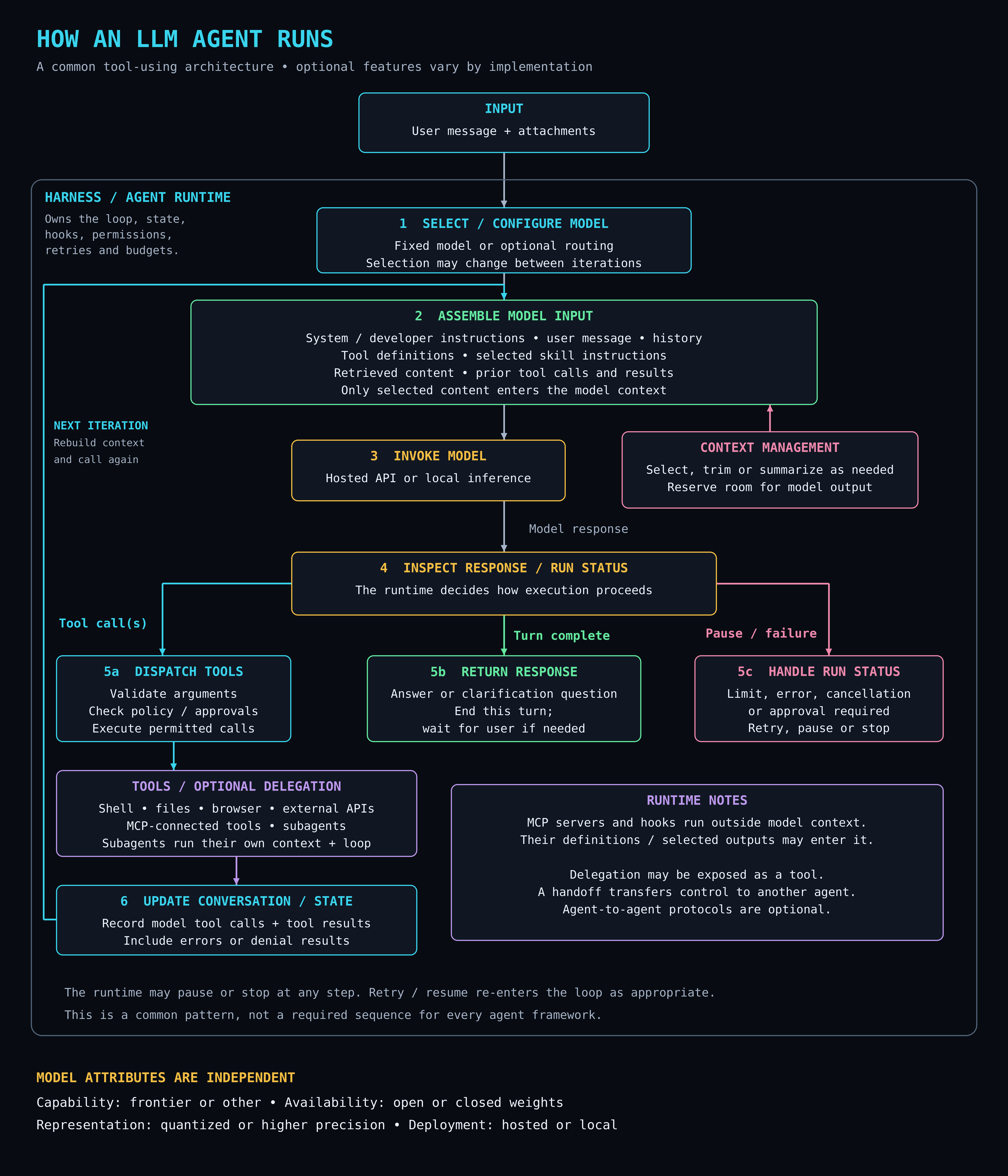
I printed a poster. It is 24 by 28 inches, 300 dots per inch, and it hangs on the wall where I can see it from the desk. It has one title: How an LLM Agent Runs. Under that there are eleven boxes and a lot of arrows.
People who see it ask why anyone would put a flowchart on their wall. Fair question. The short answer is that I kept drawing this diagram on whiteboards, badly, for people who had just asked me what an “agent” actually is. After the fourth or fifth time I decided to draw it once, properly, and stop.
The long answer is the rest of this post.
What is on the poster
An LLM is a large language model. It is the thing that takes in text and predicts more text. Claude, GPT, Llama, Qwen, and the models I run on my own GPUs are all LLMs.
An agent is what you get when you wrap that model in a program that can act on its answers. The program gives the model tools. The model says “run this command” or “read this file.” The program does it, hands the result back, and asks the model what to do next. That is the whole trick. The poster is a picture of that trick.
Here is the loop, top to bottom.
Input. Your message and anything you attached.
The harness. This is the big box that surrounds almost everything else. On the poster its label says it owns the loop, the state, the hooks, the permissions, the retries, and the budgets. I will come back to this box. It is the point of the whole poster.
Step 1, pick a model. Some harnesses use one fixed model. Some route between several. The choice can even change from one lap of the loop to the next.
Step 2, assemble the model input. This is where the harness builds the context. Context is everything the model gets to see on this one call: the system instructions, your message, the history so far, the list of tools it is allowed to use, any skill instructions that got loaded, anything retrieved from files or search, and the results of the tools it called last time. The poster puts one line in this box that I think is the most important sentence on the whole sheet: only selected content enters the model context.
Context management. A side box that feeds step 2. Select, trim, or summarize as needed. Save room for the model’s own output. This is the part that decides what the model forgets.
Step 3, invoke the model. Send the context in. Get text out. The poster notes this can be a hosted API or local inference. Local inference means the model runs on a machine you own instead of somebody else’s server. On my fleet it means a GPU in the next room.
Step 4, inspect the response. The model said something. The harness reads it and decides what happens next. Three things can happen.
5a, tool calls. The model asked to use a tool. The harness checks the arguments, checks policy and approvals, and runs only the calls it permits. Notice who is doing the running. Not the model. The model asked. The harness decided.
5b, return a response. The model gave an answer or asked a question. This turn is over. Wait for the human.
5c, handle a run status. Something outside the model’s control happened. A limit was hit, an error came back, someone cancelled, or an approval is required. Retry, pause, or stop.
Tools and delegation. The actual tools: shell, files, browser, outside APIs, tools connected through MCP, and subagents. MCP is the Model Context Protocol, a standard way to plug a tool server into a harness. A subagent is a whole second agent that gets its own context and its own loop, does a job, and reports back.
Step 6, update state. Record what the model asked for and what came back. Errors and denials get recorded too. Then the arrow goes all the way back up to step 2, with the label rebuild context and call again.
At the bottom there is a footer that says the runtime may pause or stop at any step, and that this is a common pattern, not a rule every framework follows. I put that there on purpose. It is a map of the usual shape, not a spec.
Why I wanted it on the wall
There is one idea I wanted to stare at every day, and it is this: the model is one box. Step 3. Everything else on the poster is the harness.
When people talk about an agent being smart or dumb, careful or reckless, fast or slow, they usually mean the model. Sometimes they are right. Often they are describing the harness and do not know it.
Did the agent forget what you told it ten minutes ago? That is step 2 and the context management box. The harness trimmed it, or never selected it. The model cannot remember something it was never shown. There is no memory in that box. Each lap of the loop, the context is rebuilt from scratch and the model reads it fresh.
Did the agent do something you did not want? Look at 5a. The model asked. The harness checked policy and approvals and said yes. If nobody wrote the policy, the answer was yes by default.
Did the agent stop halfway through? That is 5c. A budget ran out or a limit tripped. The model did not give up. The runtime did, and it was probably configured to.
Did the agent go off and do three things at once? Delegation. The harness exposed a “spawn a subagent” tool, the model called it, and now there are two loops running with two separate contexts. The poster’s runtime notes say that a handoff transfers control to another agent, and that agent-to-agent protocols are optional. Those are choices made by whoever built the harness.
I run a lot of these loops on my own hardware. What the poster reminds me is that when I am debugging one, the model is usually the last place I should look. The bug is almost always in what I fed it, what I let it run, or what I threw away between turns.
The runtime notes
There is a box in the lower right I almost cut and am glad I kept. It says MCP servers and hooks run outside the model context. Their definitions, and whatever they return, may enter it.
A hook is a bit of code the harness runs at a fixed moment, like before a tool call or after a response. The model never sees the hook. It only sees the result, if the harness decides to show it. Same with an MCP server. The server is a separate process. The model sees a tool definition and, later, some output.
This matters for two reasons. The first is cost. Every token you put in the context is a token you pay for, in money or in GPU time. Things that run outside the context are free from the model’s point of view. The second is trust. Output from a tool is data, not instructions. The poster does not say that in so many words, but the arrow from tools back to step 6 and then up to step 2 is where every prompt injection in the world enters. Watch that arrow.
The footer
The last block on the poster has nothing to do with the loop. It is a list of four things about the model itself, and a claim that they are independent of each other:
- Capability: frontier or other. Is this one of the best models available right now, or something smaller?
- Availability: open or closed weights. Weights are the numbers that make up the trained model. Open weights means you can download them. Closed means you cannot.
- Representation: quantized or higher precision. Quantized means the weights have been squeezed into fewer bits so the model fits in less memory and runs faster, at some cost to accuracy.
- Deployment: hosted or local. Whose computer is it running on?
I added this because people collapse these four into one axis all the time. “Local” gets heard as “small and dumb.” “Frontier” gets heard as “hosted and closed.” None of that follows. You can run an open-weights model, quantized, on a card in your basement, and it can be frontier-class for the job you gave it. You can pay for a hosted model that is none of those things. Every one of the four is a separate decision, and every one of them changes step 3 and nothing else. The loop around it does not care.
Why print it
I could have kept this as a PNG. I have plenty of PNGs. Nobody looks at them.
A poster on a wall gets looked at by accident. It gets pointed at during a conversation. It gets read while waiting for a build. That is worth more to me than a file in a folder, and the print cost less than a nice lunch.
It is also a check on myself. If I look up at it and something on it is wrong, I have to reprint it. I only just hung it, so the real test starts now. I will let you know when it stops being true.
If you want your own, the full resolution image is linked at the top of this post. Print it at 24 by 28 inches at 300 dpi, or scale it down. It reads fine at half size. It just would not be much of a poster.