
Two Networks, One Mast
Sooner or later, everyone building a radio mesh runs into the same idea. You have one good high spot. A roof, a pole, a tower. You already put one antenna up there. Why not two?
Maybe you want to run both MeshCore and Meshtastic. Maybe you want a spare. The mast is up, the cable is run, and bolting on a second antenna looks free.
It is not free. But the fix is cheaper and stranger than most people expect.
The problem in one sentence
Both radios live in the same slice of the airwaves, near 915 MHz. They sit about 3.65 MHz apart. And both of them shout at the same volume, about a quarter of a watt.
Put those two antennas a few feet apart, and every time one radio talks, the other one is staring into a flashlight. It goes deaf for that moment.
What you need is separation between them. Radio people measure that in decibels.
Decibel (dB): a way to measure how much weaker a signal got. Every 10 dB means ten times weaker. So 20 dB is a hundred times weaker, and 60 dB is a million times weaker.
Isolation: how much the two antennas ignore each other. More isolation is better. It means less of your loud radio leaks into your listening radio.
Here is the number that matters, and it is the whole point of this post:
Ten feet of vertical separation gives you about 67 dB of isolation. Getting that same 67 dB side by side takes 191 feet.
Same antennas. Same radios. Nineteen times the distance. The only thing that changed is the direction you measured in.
Why the radios cannot just take turns
Inside one single radio, this problem was solved decades ago. A radio knows when it is about to transmit, so it shuts off its own ears first. No harm done.
Two separate radios running two different programs cannot do that. Meshtastic does not know MeshCore exists. Neither one can tell the other to be quiet for a second. There is no shared clock and no way for them to negotiate. Each one talks whenever its own rules say to talk.
So the fix cannot come from software. It has to come from where you put the antennas.
The donut, and the hole in the middle
Here is the part that makes vertical separation work so well.
A normal upright antenna does not spray signal in every direction like a light bulb. It sprays it out sideways, in the shape of a donut. Strong out to the sides. Almost nothing straight up, and almost nothing straight down.
Omnidirectional antenna: an antenna that sends signal out evenly in all horizontal directions. Think of a donut lying flat, with the antenna standing in the hole.
Null: the dead spot in that pattern. For an upright antenna, the nulls point straight up and straight down.
Now stack two of them on the same pole, one above the other. Each antenna is sitting in the other one’s dead spot. For the signal to get from the top antenna to the bottom one, it has to squeeze out through one dead spot and then squeeze in through another.
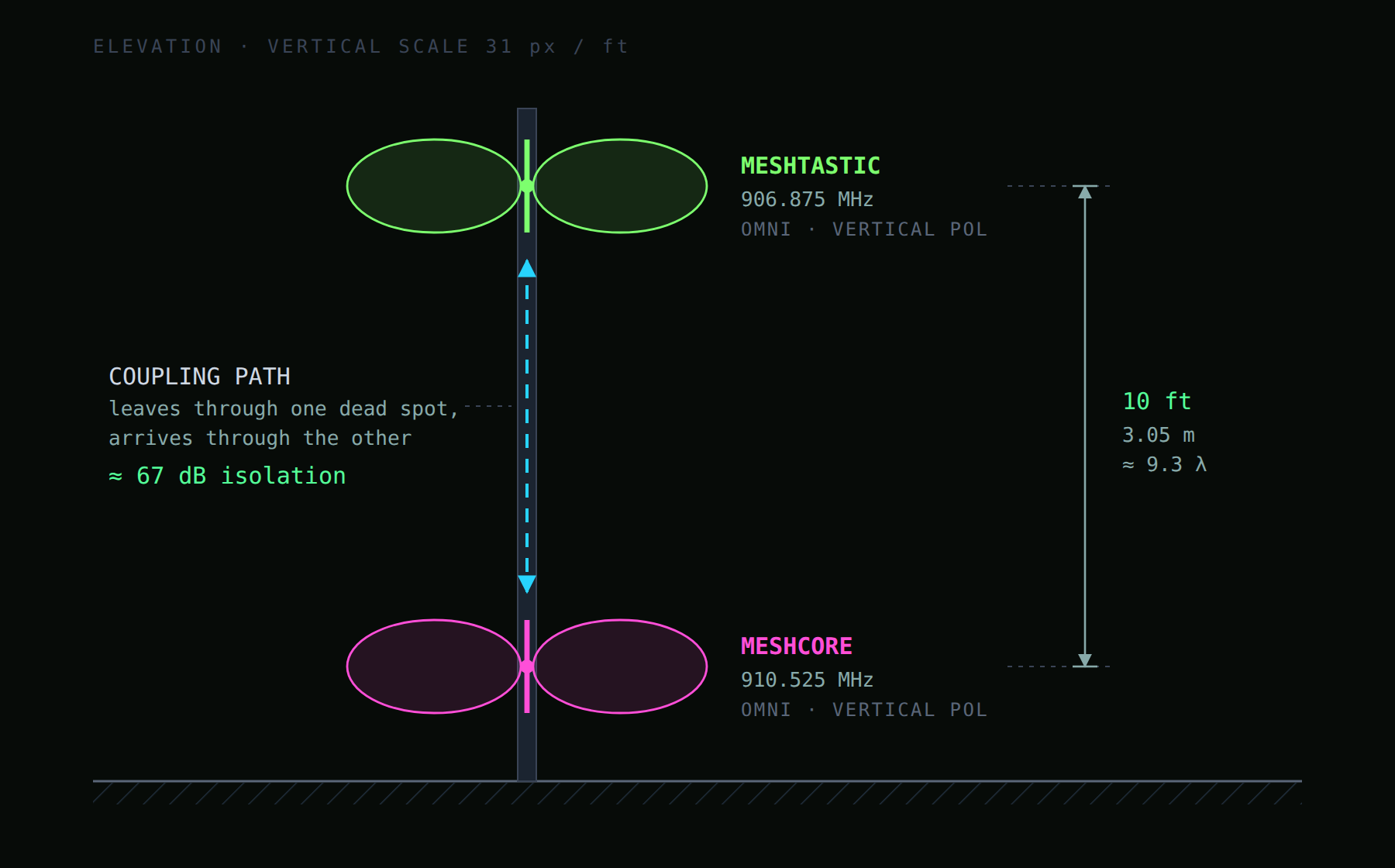
Now put those same two antennas side by side instead. You just did the exact opposite. Each one is aimed right at the other, straight through the strongest part of the donut.
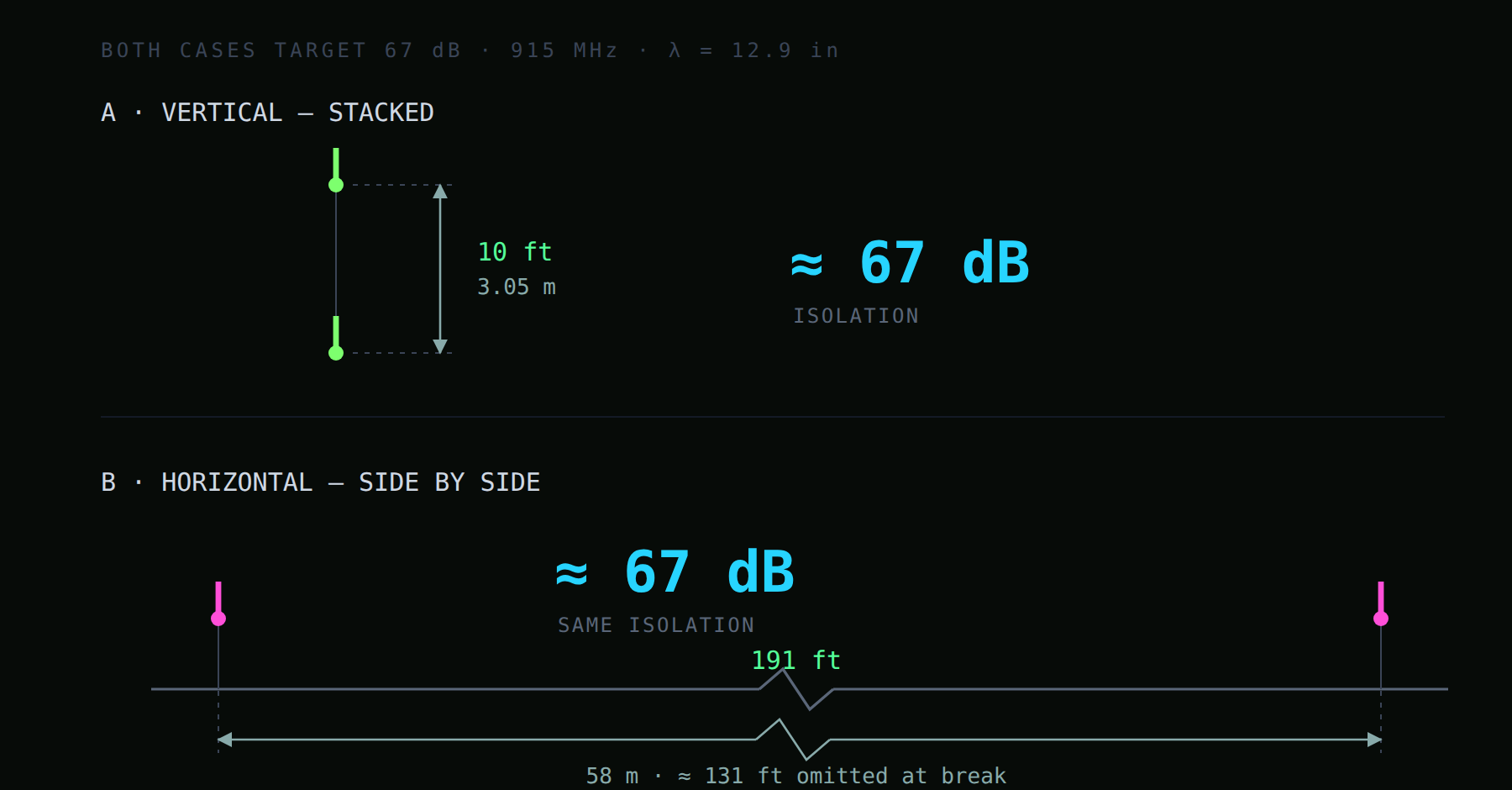
Same protection. One of them fits on your roof.
Forty versus twenty
The donut explains which direction wins. This next part explains by how much, and it is the real argument.
When you stack antennas, isolation grows about 40 dB for every ten times you increase the distance. Side by side, it only grows about 20 dB for the same jump.
Vertical does not just win. It wins faster, and the gap keeps growing the farther you go.
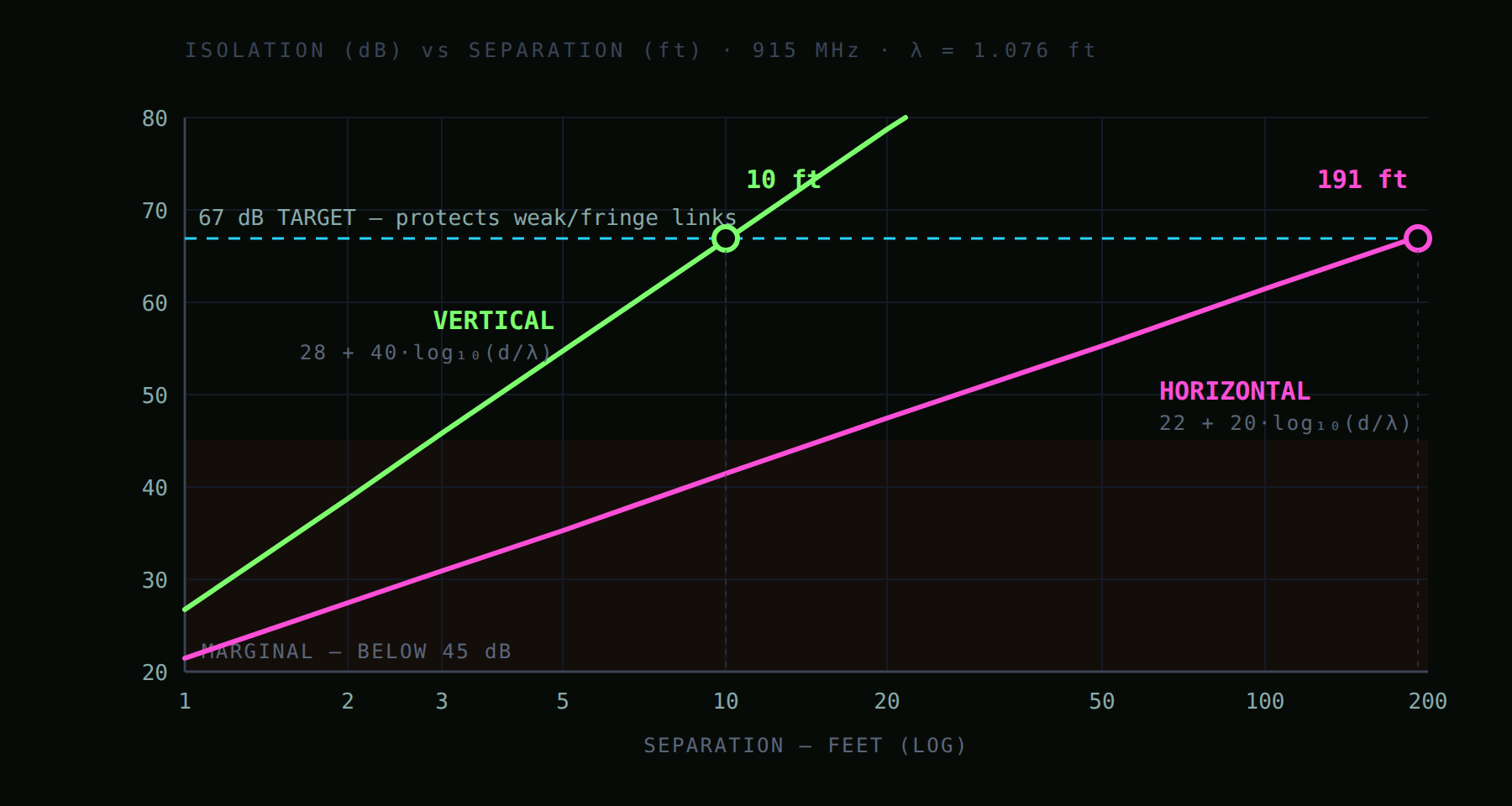
At one foot apart, the two setups are only about 6 dB apart. Annoying, but you would survive it. By the time you need 67 dB, one setup needs a ten foot pole and the other needs a football field.
The numbers, if you want to skip the theory
| Distance apart | Stacked | Side by side |
|---|---|---|
| 1 ft | 27 dB | 21 dB |
| 2 ft | 39 dB | 27 dB |
| 3 ft | 46 dB | 31 dB |
| 5 ft | 55 dB | 35 dB |
| 10 ft | 67 dB | 41 dB |
| 20 ft | 79 dB | 47 dB |
| 50 ft | n/a | 55 dB |
| 100 ft | n/a | 61 dB |
| 191 ft | n/a | 67 dB |
What those stacked numbers mean in practice:
- 1 foot (27 dB). Too close. You are getting near the level that can damage the receiver chip.
- 2 feet (39 dB). Risky. Weak signals will get stepped on.
- 3 feet (46 dB). It works. You will lose some of your longest contacts.
- 6 feet (58 dB). Good. A sensible trade if your pole is short.
- 10 feet (67 dB). The target. The two radios basically stop noticing each other.
- 15 feet (74 dB). More than you need. Spend that pole on height instead.
Where 67 dB comes from
That number is not a folk tale. It falls out of one question. What is the faintest signal you still want to hear?
Both radios put out about a quarter of a watt. The receiver chip can shrug off a certain amount of noise on its own. So you work backward from the quietest station you care about.
| Your goal | Isolation you need |
|---|---|
| Just do not break the chip | 22 dB |
| Nearby strong nodes still work | 34 dB |
| Faint faraway nodes still work | 67 dB |
This is the part worth sitting with.
If you build for 34 dB, everything looks great on your workbench. The nodes across town are loud, so they come through fine. What you quietly threw away is the node at the very edge of your range. That faint one is the whole reason you climbed the pole.
Protecting the faint ones is the job of a tall antenna. Everything else you could have heard from your kitchen table.
Three things that will bite you
These are estimates, not promises. A metal pole, guy wires, and a nearby roof all change the real answer by several dB in either direction. Treat ten feet as a target, then measure once it is up.
Isolation does not fix transmitter noise. This is the one that sends people shopping for expensive parts at midnight. A transmitter does not only make noise on its own channel. It smears a little noise across nearby channels too. Some of that lands right on top of the other radio’s channel. Once that happens, no amount of good listening helps, because the noise arrived already mixed in with the signal. The only fix is a filter on the radio that is talking. Cheap filters cannot do this job. You need a tuned metal can called a cavity filter.
Duty cycle is quietly saving you. A mesh radio only talks about 1 to 5 percent of the time.
Duty cycle: what share of the time a radio is transmitting instead of listening.
Because of that, even a so-so setup gives you the occasional collision instead of constant deafness. This is why three foot installs work better in the real world than the table above suggests. Do not plan around it. But do not panic when your imperfect setup works fine.
What to actually do
One pole, two networks: stack them. Ten feet if the pole allows it. Six feet if it does not. Three feet if that is all you have. Below three feet, stop measuring and start pricing filters, because at that point the filter costs less than the climb.
And here is the cheap way out that a lot of people miss.
If only one of those two radios ever transmits, and the second one is only there to listen, none of this applies to you. A radio that never talks cannot deafen anything. It just loses the small handful of messages that happen to arrive while its neighbor is talking. A couple of feet is plenty.
The whole problem goes away the moment one of the two radios stops talking. If you are just trying to watch a second network rather than join it, put it in listen only mode and save yourself the pole.
If you are new to this, the earlier post When the Cell Towers Go Quiet covers what MeshCore and Meshtastic are and why you would run either one.
All figures are open air estimates at 915 MHz. Measure your own install. Frequencies listed are the Meshtastic LongFast slot 20 center and the MeshCore US and Canada default.